BeforePersistent controls

SceneCrane pathReference locked
CropMaskCameraStyleReferenceGenerate
Every possible action competes with the content.
Storynote · Brand and product design · 2025–2026
I designed the identity, node UX, interface system, and chat-first prototype around the same structure: explicit entities, visible relationships, and controls that appear in context.
 Storynote.ai
Storynote sample frames
A recurring crane, bamboo, and torii gate show how visual references can carry across a sequence while framing and composition change.
Frame 01Establish the visual world

Frame 02Keep the subject language
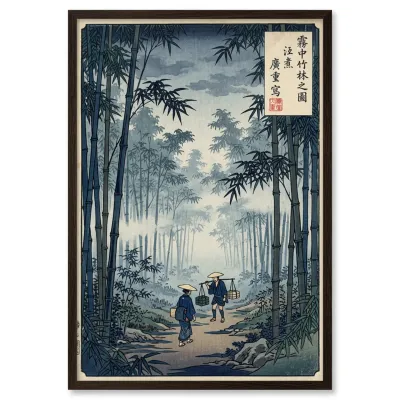
Frame 03Shift the setting

Frame 04Preserve the art direction
Brand construction
I designed the Storynote mark by combining a sticky-note frame with an S-shaped node path. The product's connected-node model is present before the interface even opens.
The result reads as a compact [S): note, connection, and name in one gesture.

01Sticky noteThe container and folded corner

02Node pathAn S drawn as connected entities
03Storynote [S)Product logic carried into identity
Symbol · wordmark · product descriptor
Product type
Plus Jakarta SansA clear UI voice with compact labels and calm hierarchy.Core palette
Interaction decision
The early interface showed every control around every object. I redesigned it as compact, note-like nodes with contextual actions and a focused inspector.
At rest, each node shows its identity and relationships. Hover reveals common actions. Selection opens deeper settings.
Try the node states
Keep identity and relationships visible.
Every possible action competes with the content.
The object stays legible; the needed action arrives in context.
Reusable product language
Nodes, actions, connections, and inspectors repeat the same hierarchy across the workspace. I defined their structure and states so the graph remains readable before deeper detail opens.
Semantic light and dark surfaces keep the same components legible in both themes.
Storynote interface kitFoundations, states, and domain componentsRest → Hover → Selected → Disabled
Plus Jakarta Sans
Regular · Medium · Semibold
Surface · Layer · Border · Accent
Canvas · Panel · Raised · Accent
Object identity, generation settings, references, and actions stay in the same order.
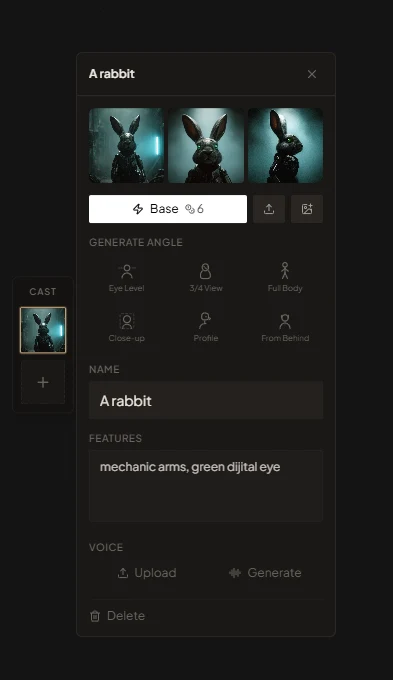
The Cast panel brings reference images, angle generation, defining features, and voice controls into one editor. The same component rules support the rest of the node workflow.
Chat-first workflow
Composer starts with the creator's instruction. VSON maps it to explicit scene entities, references, and relationships. Studio exposes the same state as nodes for inspection and revision.
Natural-language editing becomes a direct entry point without turning scene structure into a black box.
Storynote.aiComposer
Explicit scene state
Describe the change in natural language.
Map the instruction to the relevant graph object.
Keep preserved and changed attributes visible.
VSON · Scene ontology
VSON represents scene entities and relationships in a machine-validatable graph. It checks the graph's structure, not the truth of the image.
Image compositionCompositiondepictsCrane
CompositioncontainsTorii
CompositionviewedByCamera
Graph structure validIdentity
A sticky-note frame and an S-shaped node path made connection part of the brand.
Interaction
Content remains visible at rest, actions appear in context, and deeper settings live in the inspector.
Workflow
Composer captures the instruction while VSON keeps scene entities and relationships explicit.
Takeaway
Storynote kept the graph and made its layers easier to read: identity at rest, common actions in context, deeper structure in the inspector, and chat as a direct entry point.